Show Posts

This section allows you to view all posts made by this member. Note that you can only see posts made in areas you currently have access to.


Messages - Jean-Yves

Pages: [1] 2 3 ... 7
1
Virtualization / Re: ArcaOS 5.1 on Apple Silicone
« on: January 26, 2026, 12:00:59 pm »
fro: thanks for the shell script.

martin: there is not much to say really - I used the supplied utm file and just set upscaler value as mentioned. If you want though, I can write up a quick summary of the steps up to the installer starting?
You'd need to add the utm config file and credit fro, as really all I did was use a file they supplied.

2
Virtualization / Re: ArcaOS 5.1 on Apple Silicone
« on: January 20, 2026, 01:33:04 pm »
It works!  Thank you so much. At first of course I could not help tinkering and went and enabled USB and then forgot about that, after which it carried on hanging on the ArcaOS logo. When I remembered I'd done that, I disabled USB and the installation went through without a hitch.

One change I did make was to set the upscaling to linear (form nearest neighbour) - this dramatically improved the font rendering.

Mouse movement is a little laggy/floaty at times, but overall, happy days!

Thank you once again.

3
Virtualization / Re: ArcaOS 5.1 on Apple Silicone
« on: January 14, 2026, 03:42:46 pm »
Thank you for the UTM config file! I will try getting this setup asap. :)

And thanks for link to the 86box alternative method, which I'll try as a backup of the UTM config does not work for me.

4
Virtualization / Re: ArcaOS 5.1 on Apple Silicone
« on: July 15, 2025, 12:27:52 am »
Resurrecting this old thread just to ask whether anyone has managed to get ArcaOS or indeed eCS or even OS/2 Warp 4 installed and running on UTM on an M-series Mac?

I get as far as the ArcaOS logo in the installation program, then it just sits there indefinitely. So not very far at all. I've tried various hardware profiles, but no joy.

If anyone has managed it, would they mind posting their config values here?

5
Sorry, not had much time for any OS/2 stuff recently. I hope to have another try this weekend.

6
Hi Richard,

I thought I'd answered already but seems like my reply went into \DEV\NUL or something! :D

Anyway - I tried, but as soon as I tried adding disk 2 contents to the disk 1 files in the combined folder, there was a filename clash.

Hey ho - I'm going to try to get my eComStation VM image over to my Linux laptop and see what I can do on that.  I'm pretty sure I have the 2.0 pre-release running on that image already so it should work.


JY

7
Hi Jean-Yves,

I'm really sorry to hear that you're having issues. I've replied separately by private message

Have replied by PM too but just to repeat what I said there, no apology is needed - I'm pretty sure it does not say compatible with ArcaOS 5.1 on the box  ;D


8
Hi Neil, from what I can tell in the docs, 2.0 is 32-bit so should work fine.

My understanding is that 3.0 is Windows-only. Is that incorrect?

9
So in the end I decided to just re-install ArcaOS 5.1 with a 2GB drive instead of 4GB.

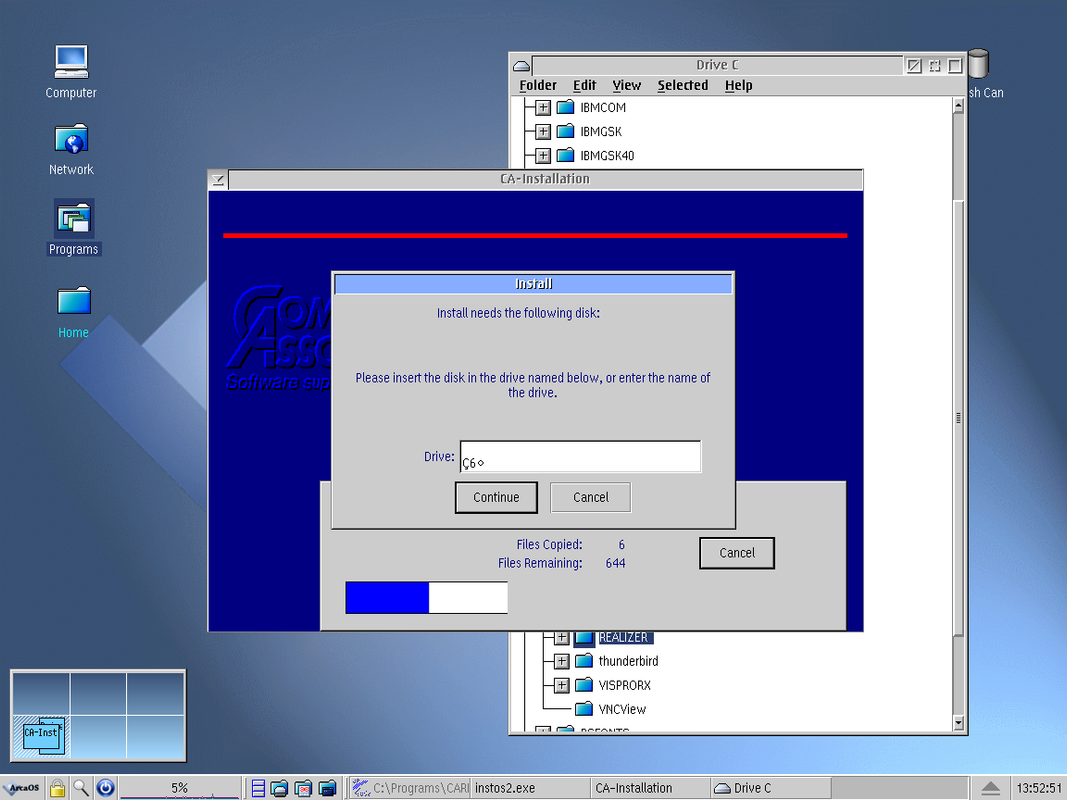
The installer ran and disk1 completed, then when it asked for disk 2, it repeatedly failed to accept A: as a drive, saying it could not find the path and asking for it again, defaulting to a corrupted path of a "C" with some kind of cedilla, a 6 and then a small diamond character.


I then mapped a shared folder and in that placed 7 directories with the disks 1-7 files in the appropriate one. My thinking was that since the installer prompts for the location of each disk, I did not need to use the floppy images.   Again, same error

Since the image files were made from the same set of diskettes that I now have and both the images and raw files have this issue, can we assume that something on the original installer is corrupt?

Richard did you manage to install from the images your end?

10
Many thanks both. I’ll report back how it goes.

11
I've hit another problem.

I downloaded the images from archive.org, renamed them all to .img so that Vbox would understand them, and then run the installer. However,  because my virtual hard drive is 4GB, the installer program free-space checking routine has an overflow error and reports -1295516K available (note the minus sign).

Is there a way around this, short of creating a second VM, installing on a smaller hard disk and then copying the installed files and config.sys entries over?  Does anyone know whether any other config files are amended/created?

The installer is a .exe so not modifiable rexx.

What's the max HDD size that OS/2 circa 1993 knew about, does anyone know? Should I play safe and give it just 500MB? I've a feeling that ArcaOS wants more though?

12
Ahah!  Well that’s good news.

Thanks Richard  ;)

Ivan, Steven, many thanks for that info. All good to know.

13
Hi,

I'm trying to create disk images of the retail copy of CA-Realizer 2.0 which I managed to buy recently. Amazingly I was able top copy over the files from all 7 installation diskettes.

For the diskette image, I downloaded the empty floppy image package from archive.org [1]

Initially I used the 2.88MB empty file but ArcaOS (in VirtualBox 7 on Linux) fails to read these. I get a "SYS0027: The drive cannot find the sector (area) requested." error when I try to go to A:

So I guess first question is - can ArcaOS read 2.88MB floppies?

Assuming not, I did then try to use the 1.44MB empty image but I was getting a not enough space error on disk4 (of 7).   What's the best way in Linux to copy the contents of a directory into a disk image file?

Incidentally, the way I copied the files from the diskettes was using a USB floppy drive and drag and dropping all files from the floppy into 7 directories on Zorin 17 Linux using the file manager (ie I did not use the terminal). 
(I know macOS adds all kinds of nonsense when copying files, which is why I did this in Linux.)
ls -al does not show anything added as far as I can tell.

Any thoughts would be appreciated. Thanks :)

[1] https://archive.org/details/blank-floppy-disks

14
Virtualization / Re: ArcaOS 5.1 on Apple Silicone
« on: August 24, 2024, 06:47:42 pm »
Hi thanks for that info and apologies for very late reply - I was hoping the fix would be incorporated into UTM, but that's still not done so for now I've just installed it in VBox on my Linux laptop that is Intel-based. Bought the 5.1 upgrade yesterday :)

15
Virtualization / Re: ArcaOS 5.1 on Apple Silicone
« on: July 17, 2024, 10:59:23 am »
Sorry for late reply and thanks for looking into this. :)

I was aware of the native build for AS but I've been told to steer away from this as it's already no longer supported and from what I can tell speaking to a few people (on the webs, so pinch of salt, etc), there are no plans to resurrect it.  From memory VBox asks for escalated privileges for some of its processes - I'd rather not allow that for something that won't get security updates.

PS - I've not got around to buying 5.1 yet.  So it's not urgent.

Pages: [1] 2 3 ... 7